VoIP vs Landline for Small Business: What Actually Matters (Cost, Reliability, and Day‑to‑Day Friction)
I’ve seen this decision framed as “old vs new,” but that’s not really it. By 2026, landlines won’t make sense for almost any small or medium-sized business—unless you’ve got a very specific, very boring reason to keep one.
The buying decision isn’t “old vs new.” It’s whether you want to keep paying for physical constraints (copper, on‑prem boxes, truck rolls) or pay a predictable per‑user subscription and move on with your life.
Key Takeaways
- VoIP pricing is usually per user/line, and it’s broad. Expect $15–$80 per user/month depending on plan and features (Business.com). In practice, many small businesses land around ~$20 per person/month (PCMag).
- Traditional landlines are still “reliable,” but you pay for it. A traditional business landline can run $50 to $100+ per line/month (Nextiva).
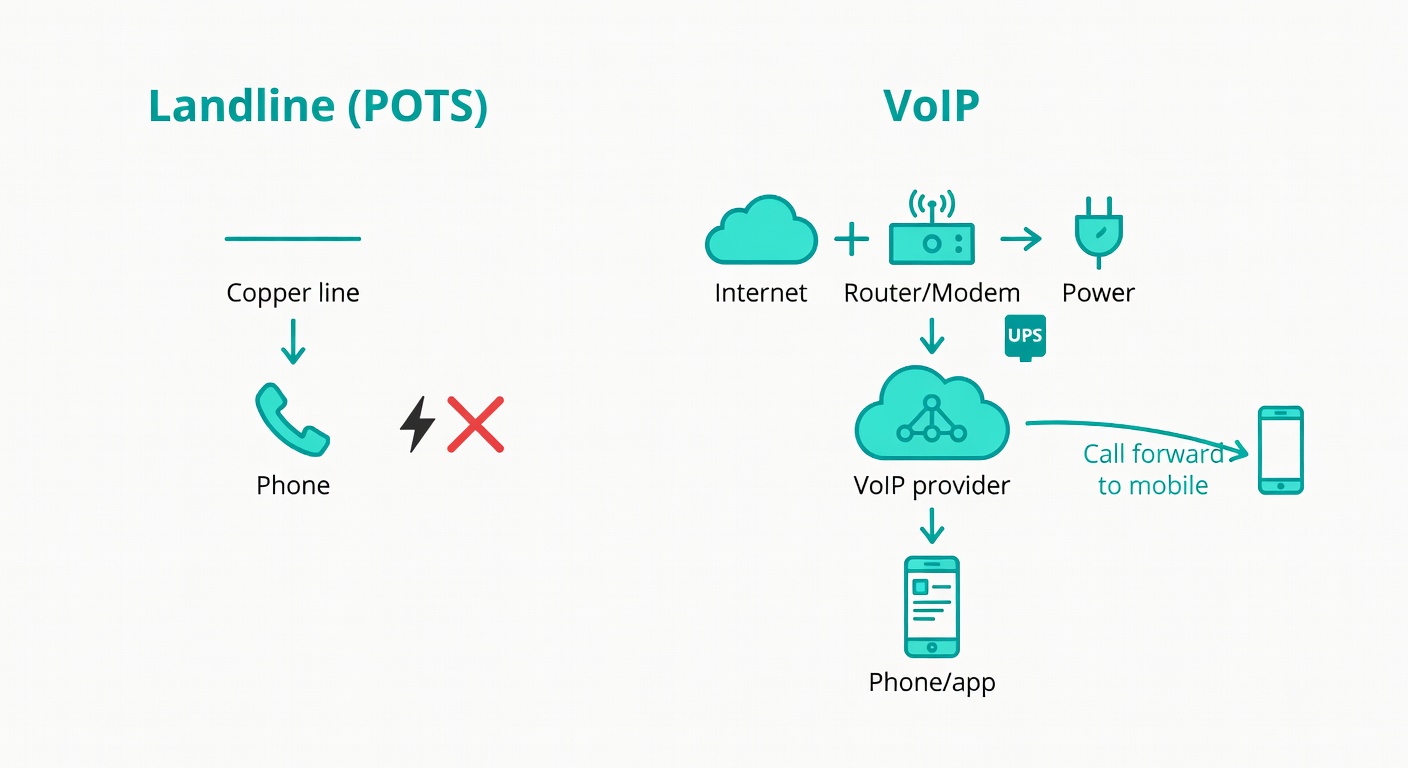
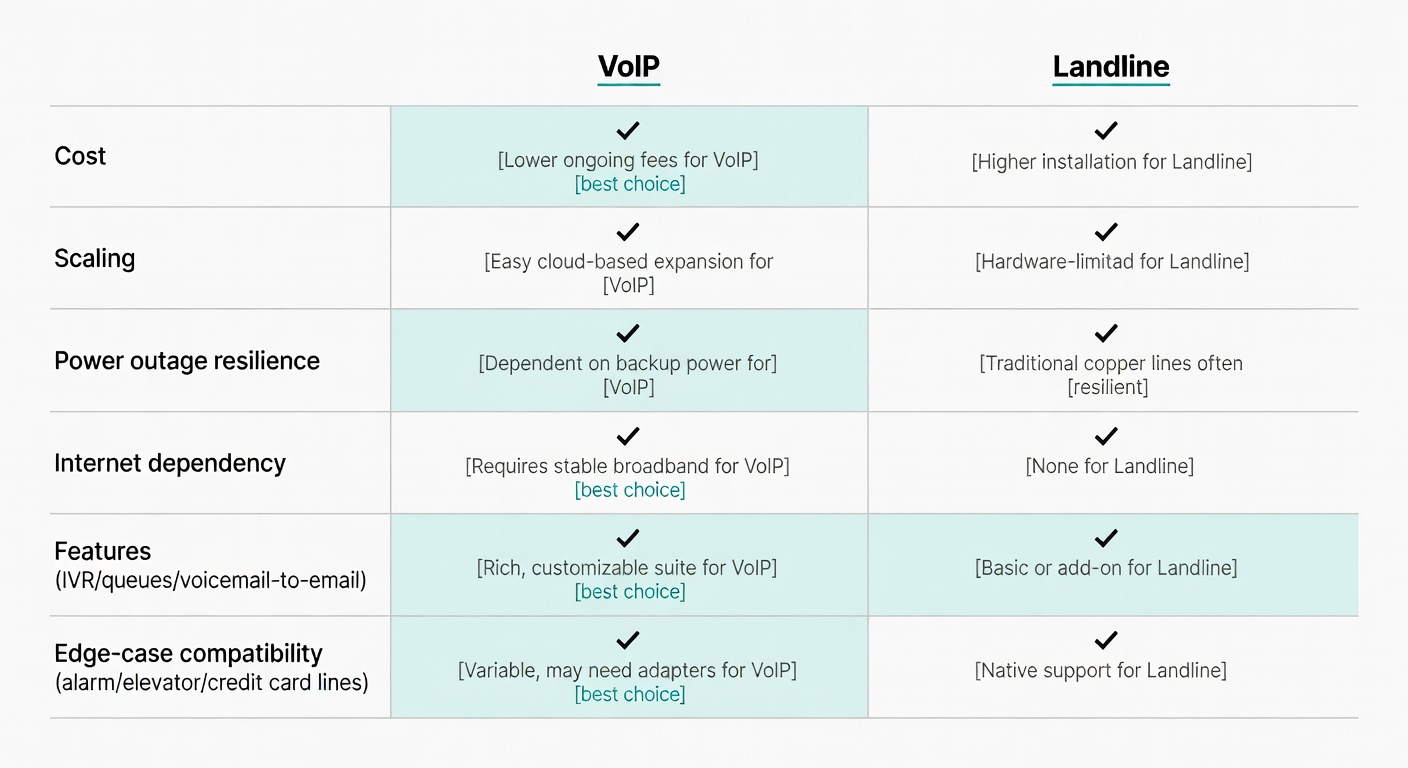
- Power outages are the one real landline flex. Landlines can keep working when the power’s out; VoIP needs power + internet. You can mitigate with a UPS and call rerouting.
- Hybrid is the sane compromise for edge cases. Keep 1–2 copper lines for alarm/elevator/credit-card lines some VoIP services don’t support (Verizon), and put everyone else on VoIP.
Buy it for the right reason, you’ll be happy. If you buy it for the marketing reason, you won’t.
The Real Difference: What You’re Buying (POTS/PBX vs VoIP/UCaaS)
A landline (often POTS) is voice over copper. In business, it often pairs with an on‑prem PBX—the box in the closet that becomes everyone’s problem eventually (Dialpad).
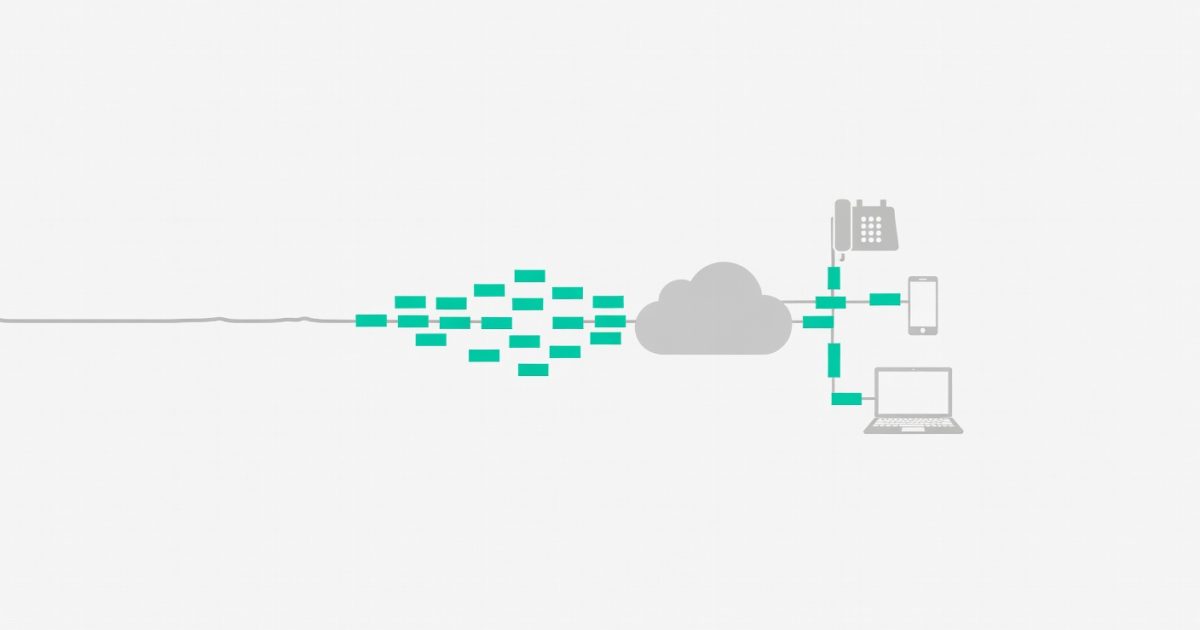
VoIP turns your voice into data packets and sends them over the internet to your provider, which routes calls to the regular phone network (PSTN) as needed (Dialpad). You can use desk phones or softphones (apps). Microsoft’s framing is basically: calls over the internet, across devices, with easier scaling (Microsoft).
Most modern VoIP is really UCaaS: voice plus texting, internal messaging, and video in one admin panel (Business.com).
So, what are you buying?
- Landline: infrastructure + maintenance obligations
- VoIP/UCaaS: a service + an internet dependency
That’s the trade.
Cost: Monthly Bills, Hidden Fees, and the Stuff Quotes ‘Forget’ to Mention
This is the part that matters.
The blunt price ranges (with the fine print)
VoIP is commonly priced per user/month:
- $15–$80/user/month is a typical cloud phone range (Business.com)
- PCMag’s tested range includes ~$20/person/month as a common SMB expectation (PCMag)
Traditional landlines? $50 to $100+ per line/month (Nextiva).
The hidden costs that actually change the bill
-
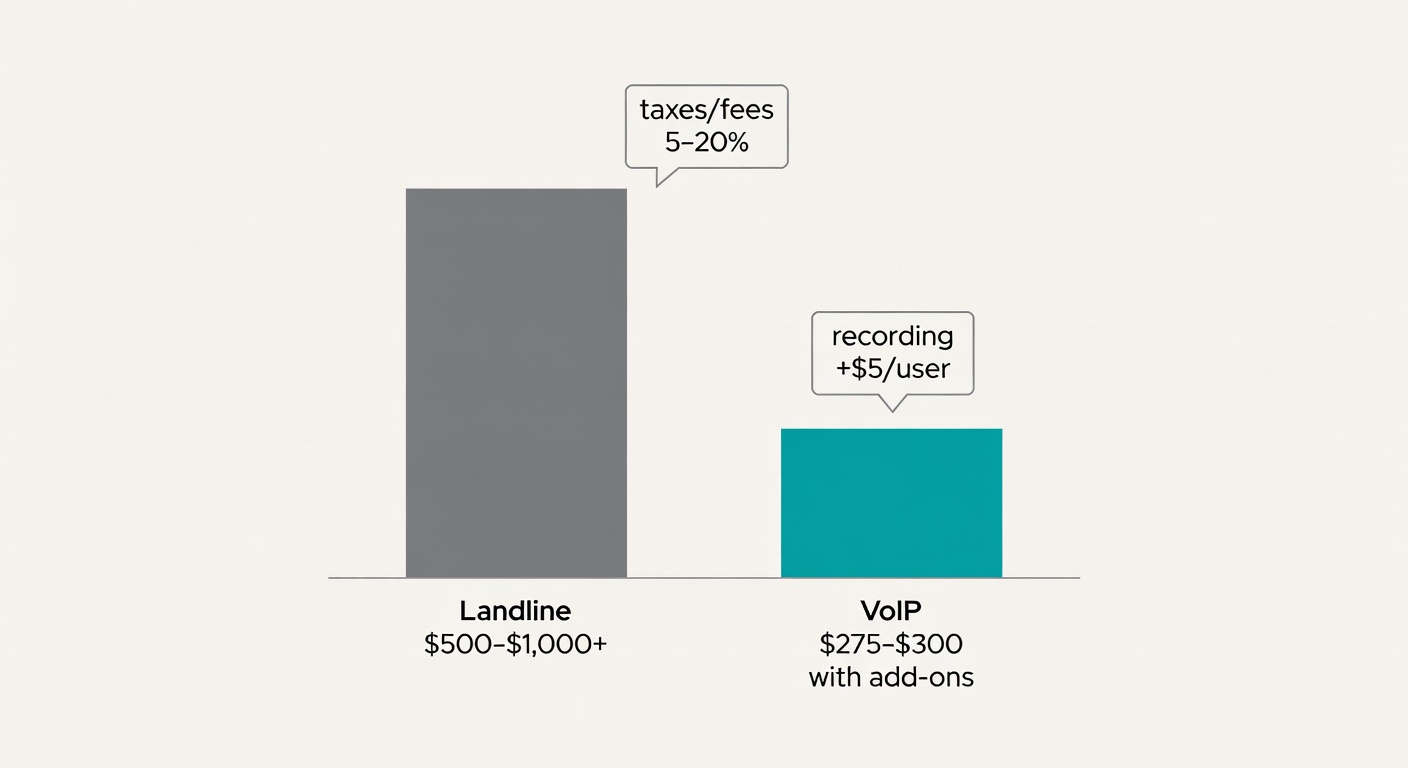
Taxes/fees/surcharges
Nextiva notes taxes and regulatory fees can add 5–20% (Nextiva). Translation: stop trusting the sticker price—and yes, hidden fees are usually where the “great deal” quietly stops being great. -
Add-ons you assumed were “basic”
Recording, extra numbers, toll-free, integrations—often extra. Nextiva calls out add-ons like $5–$10/user for recording and $5–$15/number for toll-free (Nextiva). -
Contracts and early termination fees
Some “deals” require multi‑year terms. Verizon’s Business Digital Voice example calls out a 2‑year contract required in some cases (Verizon). The catch is rarely the monthly price—it’s the exit.
A concrete 10‑user example (realistic, not magical)
Option A: Landlines
At $50–$100+ per line/month, 10 lines is $500–$1,000+/month (Nextiva).
Option B: VoIP
At ~$20/person/month, 10 users is ~$200/month (PCMag). Add reality:
You’re roughly at $275–$300/month for a functional setup—versus $500–$1,000+.
That gap is why I’m comfortable being uncompromising here.
Reliability & Call Quality: Internet Dependency, Power Outages, and Your ‘Plan B’
Landlines can keep working during power outages. VoIP usually won’t—because your modem/router and internet need power (Dialpad).
So the real question is: what’s your continuity plan when the internet flakes out?
What I’d do (and what I’ve seen work)
- Put your modem/router on a UPS (30–60 minutes is plenty for most outages).
- Set failover rules to forward calls to mobiles if the office goes offline. Verizon explicitly pitches rerouting calls during outages (Verizon).
- Keep a “break glass” mobile phone for the front desk number if you’re customer-facing.
VoIP reliability isn’t automatically bad. Dialpad notes many providers boast 99% uptime, and Dialpad claims a 100% uptime SLA for UCaaS users (vendor-stated, but a useful benchmark) (Dialpad).
Features That Change Daily Work (and Which Ones Are Just Nice-to-Have)
Most comparisons turn into feature soup. Here’s the stuff that actually changes outcomes.
1) Look professional without hiring a receptionist
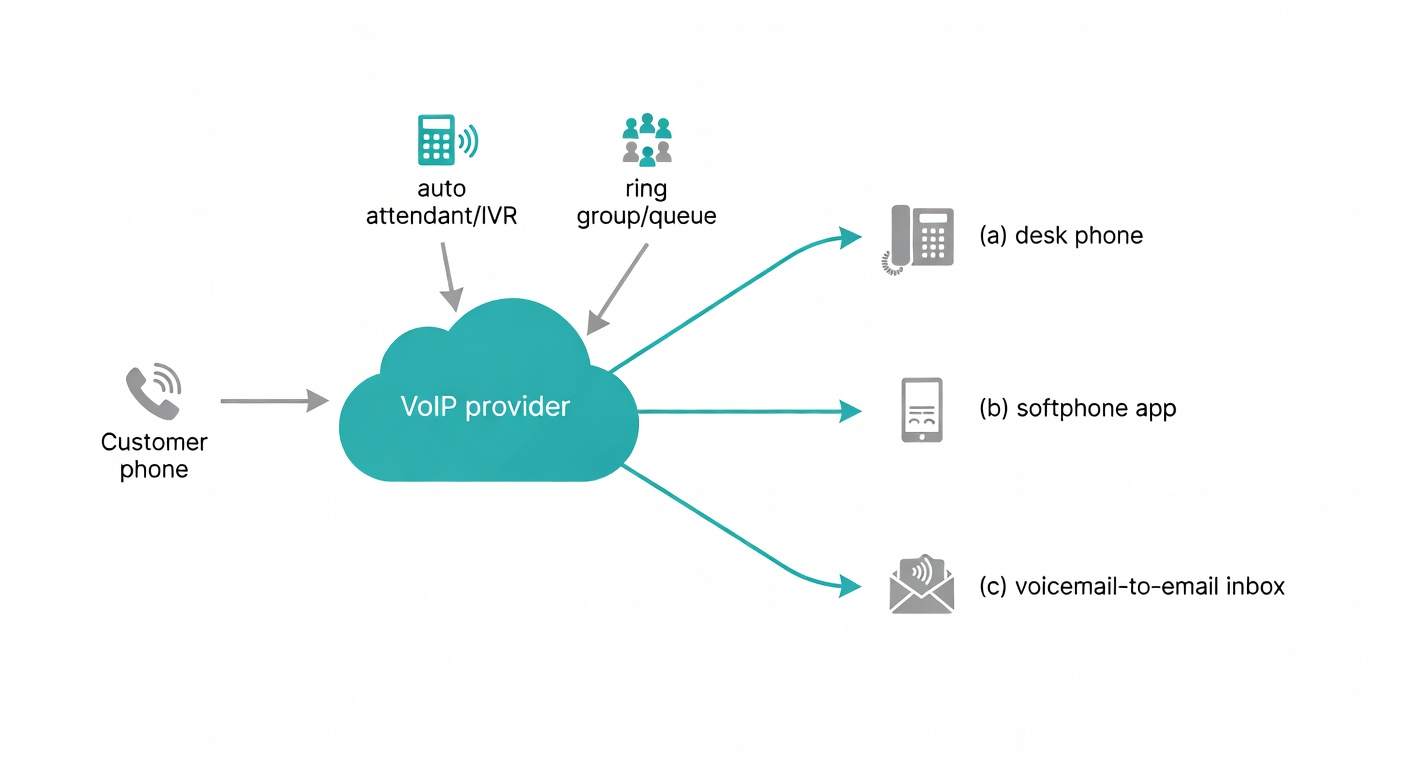
Auto attendant / IVR (“Press 1 for Sales…”) is table stakes in modern business phone systems (Business.com).
2) Don’t miss calls (because you were making coffee)
Ring groups, call queues, voicemail-to-email—the stuff that prevents “sorry we missed you” from becoming your brand (Business.com).
3) Work anywhere (without the faff)
VoIP is built for mobile/desktop apps. Dialpad frames VoIP as a better fit for distributed work, while landlines are tied to physical wiring (Dialpad). Microsoft makes the same point: device flexibility and remote/hybrid support are core benefits (Microsoft).
4) Visibility (useful, but mind compliance)
Call recording and transcription can save time (training, disputes, “what did the customer say?”). Business.com notes these are common in modern systems (Business.com).
Just don’t sleepwalk into recording laws and retention policies.
Also: landlines are basically single-channel. Dialpad calls this out—VoIP systems often add SMS/IM/video so customers can reach you how they actually communicate now (Dialpad).
Decision Guide: When Landlines Still Make Sense, When VoIP Wins, and When to Go Hybrid
Keep/consider landlines if…
- You have alarm, fire, elevator, security, or credit-card lines your VoIP service won’t support. Verizon is explicit: those lines are not supported on Business Digital Voice, and they recommend keeping an additional copper line for them (Verizon).
- You need power-outage resilience with zero extra gear and zero planning.
That’s it.
Choose VoIP if…
- You have remote/hybrid staff (or you answer calls from your mobile sometimes). VoIP is designed for that flexibility (Microsoft; Dialpad).
- You’re scaling and don’t want to keep paying per physical line + dealing with installs.
- You want IVR, SMS, call routing, analytics without building a telecom hobby.
Go hybrid if…
Keep 1–2 copper lines for the weird legacy stuff, and run VoIP for humans. It’s the best compromise for edge cases.
Want the fastest answer? Use the calculator
If you’re in a hurry, do the quick manual check (pull your last phone bill, count users/lines, and sanity-check add-ons). Or skip the spreadsheet energy and use the calculator—we’ll estimate it in about 30 seconds: https://telcoblade.com/#calculator.
Either way, you’re trying to answer the same question: what will this cost once the real bill shows up?
Mini questionnaire (use this like a gut-check)
-
Do you have more than 10 employees?
If yes: VoIP. Scaling landlines is where budgets go to die (Dialpad). -
Do you work remotely (even occasionally)?
If yes: VoIP. Device flexibility is the whole point (Microsoft). -
Do you have alarm/elevator/credit-card lines?
If yes: hybrid. Keep a copper line for those (Verizon).
If you answered “yes” to 1–2, you’re already in VoIP territory. The only question is whether you keep one legacy line around as insurance.
CTA: run the numbers, then decide
- Pull your last phone bill.
- Count your users/lines.
- Price a VoIP plan at ~$20/user/month as a baseline (PCMag).
- Add the features you actually need.
- Add a taxes/fees buffer (5–20%) (Nextiva).
- Compare it to $50–$100+ per landline (Nextiva).
I’d recommend VoIP, with conditions. And yes, the conditions matter.
Sources
- Business.com — Business phone systems pricing and features
- Nextiva — Traditional landline vs VoIP line cost ranges
- Nextiva — VoIP cost drivers, add-ons, and taxes/fees
- PCMag — Typical SMB VoIP pricing (~$20/user) and tested range
- Dialpad — VoIP vs landline definitions, reliability notes, and scalability
- Verizon — Business Digital Voice pricing, rerouting, and unsupported line types