Choosing the Best Industrial IoT Gateway: Connectivity & Security Guide
Some later links are Amazon Associates. As an Amazon Associate, TelcoBlade earns from qualifying purchases. Live prices are on Amazon.
Operators often cut a purchase order for an “industrial gateway” before anyone names the southbound protocol, the northbound destination, the WAN class, or the person who will patch firmware. That is the wrong order, and it is the core of how to choose industrial iot gateway without ending up with a rugged box doing the wrong job.
Vendor product pages lead with IP ratings, temperature range, and mounting options. That is ruggedness tourism, not fit testing. This tutorial replaces the logo hunt with a one-sitting sequence: label the device class, map protocols, decide the edge role, label the WAN, set remote access and update recovery, then run the checklist. Logos are optional after the fit tests.
Prerequisites: What You Need Before Labeling the Job
Before any SKU comparison, put four columns on a worksheet.
- Southbound list: every protocol and connector the gateway must talk to locally, such as Modbus RTU over RS-485, Modbus TCP, OPC UA, EtherNet/IP, or proprietary serial.
- Northbound target: MQTT broker, OPC UA client, historian, REST API, or cloud service.
- WAN class: Ethernet, cellular, dual-WAN, or failover, and whether the site has a public IP or carrier-grade NAT.
- Patch and access owner: who approves firmware, who holds credentials, and who will remove vendor access after commissioning.
A missing row is a future truck roll. Do not skip it.
Checkpoint: You have a worksheet with all four columns filled enough that a vendor can quote against a job, not against a logo.
Step 1: Failed Assumption – Shop Ruggedness and Logos First
A common failure mode looks like this. A plant engineer gets approval to add remote monitoring to a compressor skid. The first search is “best industrial gateway.” The result page lists hardened routers with metal enclosures and wide temperature ranges. The order goes to the most impressive datasheet. Then the integrator arrives and finds the southbound devices speak Modbus RTU over two-wire RS-485, but the chosen box only bridges serial to Ethernet without Modbus translation. It passes bytes, not registers. The plant now owns a very rugged piece of equipment doing the wrong job.
That is the SERP trap. Physical hardening is real, but it is the last filter. A device can survive -40 C and still be the wrong class.
Before a spec sheet, write the job label in one sentence. For example: “Read 12 power meters via Modbus RTU and publish kWh values to an MQTT broker over cellular, read-only.” That sentence immediately disqualifies most routers, which is the point.
Checkpoint: You have a one-line job label. If the label still says “just a rugged gateway,” stop and fill the prerequisites again.
Step 2: Label the Device Class – Router vs Gateway vs RTU vs Modem
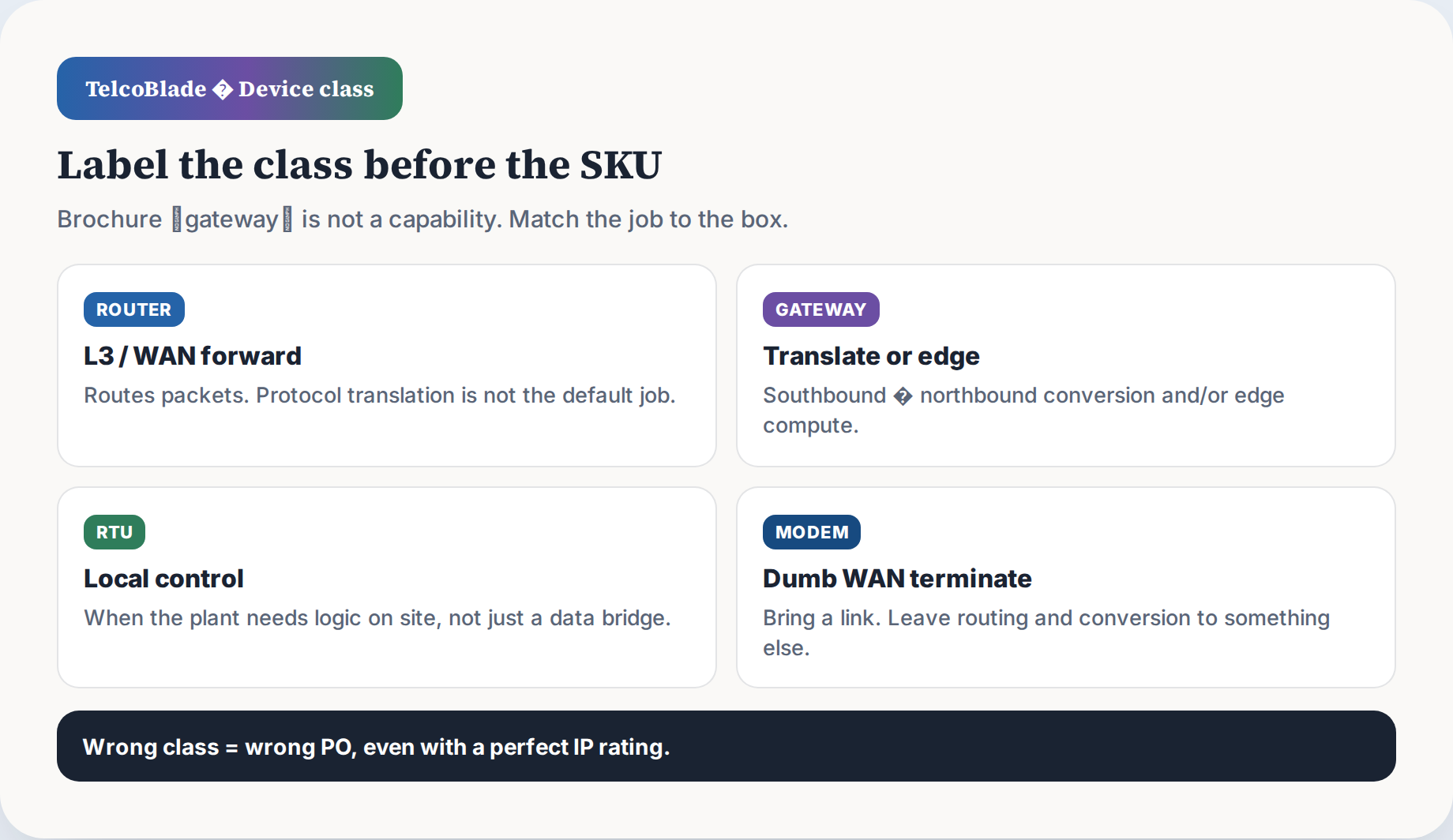
The label on the brochure is not the capability. Four classes get mixed together in industrial catalogs.
- Router: Layer 3 forwarding and WAN termination. A router moves IP packets between LAN and cellular or Ethernet WAN. By default, it does not translate Modbus to MQTT or interpret OPC UA. It can carry those protocols, but it does not understand them.
- Gateway: Southbound to northbound protocol conversion or edge compute. A gateway polls field devices on the southbound side and publishes to a cloud or historian on the northbound side. This is the common industrial IoT gateway job.
- RTU: Remote terminal unit with local control and I/O. An RTU often has digital and analog inputs and can act when communication is down. It is not just a router with a serial port.
- Modem: Dumb WAN termination. A cellular or serial modem moves bytes over a link. No protocol interpretation, no routing logic beyond what the link needs.
Operators often buy a cellular router when the site needs a Modbus MQTT OPC UA gateway. Or they buy a gateway when they only needed a serial-to-Ethernet converter. Ask which job the device is doing. If the answer is “connect the site to the internet,” a router may fit. If the answer is “translate meter registers and publish to the plant data bus,” a gateway is the class.
The industrial iot gateway vs router distinction matters because firmware and trust boundaries change. A gateway with write access to PLC registers is a control surface. A router is not.
Use the marketing-label veto test. If a datasheet says gateway but lists only Ethernet, VPN, or serial passthrough, treat it as a router. If it says router but has a built-in Modbus client and MQTT publisher, it is functioning as a gateway.
Checkpoint: You have a class label and a veto check for marketing label mismatch. If the feature list only shows Ethernet and VPN, it is a router, no matter what the box says.
Step 3: Protocol Map and Conversion Traps
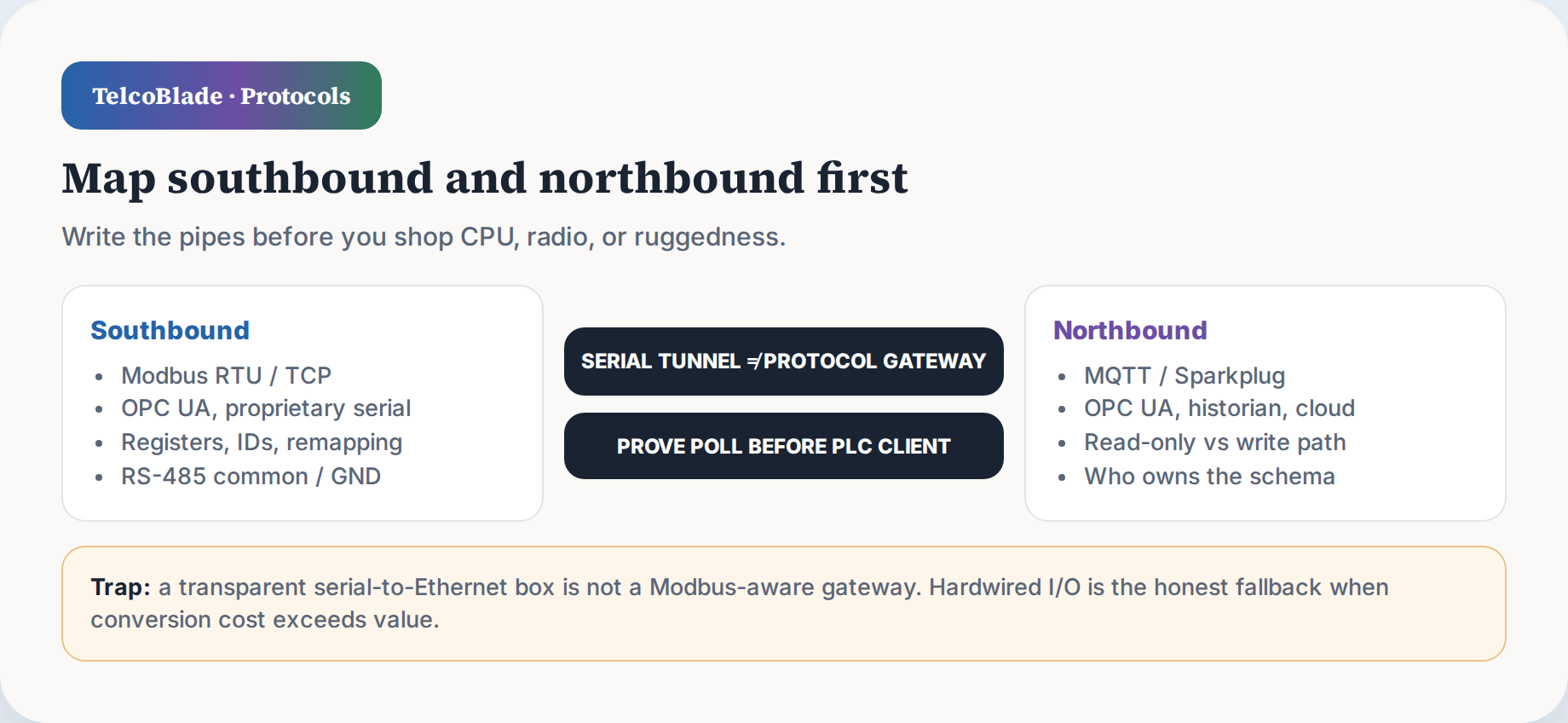
Write the southbound list and northbound target before shopping. A gateway is useful only if it can poll the exact field protocol, not just pass bytes.
The biggest trap is serial-to-Ethernet. A raw TCP, RS-232, or RS-485 serial server wraps bytes into TCP packets, but it does not parse Modbus function codes, remap slave IDs, apply poll scheduling, or publish MQTT. A dedicated Modbus gateway converts Modbus RTU/ASCII to Modbus TCP and acts as a protocol translator. The two are not the same skill just because both have a serial port.
Come-star describes the split well: a serial server enables raw serial-to-Ethernet transport, while a Modbus gateway performs protocol conversion. If you need to read Modbus RTU from a power meter and publish MQTT, a serial server plus a separate edge process is the real design, not a completed conversion.
RS-485 “2-wire” also needs a common or GND reference. Many half-duplex installs only land the A and B pins, then fail intermittently as ground offsets drift. Run the third conductor or tie the common from the gateway to the bus reference before you chase termination or bias. This is physical, not software.
Modbus slave ID ceilings vary. Standard Modbus RTU addressing supports a maximum of 247 slaves, slave numbers 1 through 247, but each Modbus network segment can have a maximum of 32 devices because of unit load constraints on a typical RS-485 transceiver, according to Siemens TIA Portal documentation. Many meters ship at ID 1, so duplicate IDs are the first thing to check on a new bus. Some gateways quote a lower practical ceiling of 32 or 64 devices per bus. Verify bus length, transceiver loading, and duplicate IDs before adding anything else.
Before deploying, prove the register poll with a tool against the serial port:
mbpoll -m rtu -a 1 -r 40001 -c 10 -b 9600 -d 8 -P none /dev/ttyUSB0
That command reads 10 holding registers from slave 1 at 9600 8N1. If the poll fails here, no gateway logic will fix it.
If conversion cost exceeds value, use hardwired I/O. A pulse accumulator or 4-20 mA input on an RTU may be the honest fallback when a legacy device has a proprietary serial protocol no gateway will speak.
Checkpoint: You have a written southbound/northbound map, a probe test that returned expected registers, and a decision on whether conversion is worth the effort.
Step 4: Edge Role – Dumb Pass-Through vs Platform
Make write-capable control an explicit decision. The default bias should be read-only monitoring until someone signs off on writes. A read-only edge can publish status, energy, or alarms without giving a remote user the ability to force a coil or change a setpoint. A write-capable edge changes the trust boundary because a compromised gateway or VPN can affect the process.
Then pick the northbound data model. Naked MQTT is transport only. It has no payload schema, so you inherit the design burden of topic names, JSON fields, units, and timestamps. OPC UA carries a self-describing information model with data types and semantics. MQTT plus Sparkplug B adds standard birth/death state and Protobuf payloads, but it is partial relief, not magic. Sparkplug still requires discipline from publishers and consumers.
The decision rule is simple. If you have a small homogeneous fleet and one dashboard, plain MQTT with a documented JSON schema is simpler. If you have multi-vendor devices and third-party consumers, OPC UA southbound plus MQTT Sparkplug B northbound is often less painful.
Also name early: a dumb gateway that later grows into a control platform changes the trust boundary. Adding a container runtime and Node-RED flows that can write registers means you are no longer a pass-through. The security posture must change with that role.
Checkpoint: You have selected read-only versus write-capable, identified whether edge compute is required, and chosen the northbound payload model.
Step 5: WAN Class – Ethernet, Cellular, Failover
When the job is really “how good is cellular at this pad,” read how to read real-world 5G benches before you trust a city median. Deeper industrial LTE router fit for remote sites is a sibling topic; do not conflate it with protocol gateway selection.
Ethernet vs cellular vs dual-WAN is a labeled job, not a feature row. If the site has managed Ethernet back to the plant, the WAN class is simple. If the panel is on a remote pad with no cable, cellular becomes primary or failover.
Choose bridge mode or router mode deliberately. In router mode, the cellular modem NATs, and the gateway behind it may also NAT. Double NAT breaks VPNs, device polling from the plant, and some MQTT keepalives. Put the cellular modem in bridge mode if the gateway behind it will own the addressing and routing. If the cellular device is the router, configure the LAN side as a proper routed segment, not a second NAT layer.
Before locking a carrier plan, survey at the install point. The bench is not the panel. Metal enclosures attenuate cellular signals significantly. A gateway that works on the bench can lose 15 dB or more inside a steel cabinet. Put the antenna outside or away from the metal wall, and test RSSI, RSRP, and SINR where the final device will live. For LTE, Digi International lists a typical RSRP range from about -44 dBm (good) to -140 dBm (bad), but the number at the actual panel is the only one that matters.
Many cellular plans use CGNAT, meaning no public inbound IPv4. A traditional inbound VPN from the office to the site dies unless the carrier gave you a public address. The fix is an outbound phone-home VPN: the gateway initiates a persistent tunnel to a known endpoint, usually a VPS or the plant’s VPN headend, and the connection is pulled from inside. No static IP required, but the endpoint must be reachable and the tunnel must survive carrier NAT.
Bandwidth and plan limits matter for remote engineering sessions. One remote PLC download or HMI screen share over a small monthly plan can destroy the data budget. Size the plan for occasional engineering traffic, not just telemetry. A local jump box reduces the need to pull full engineering files over the cellular link.
For remote sites where the primary need is WAN resilience rather than protocol translation, an industrial LTE router is often the better class. That is a separate fit test, not a feature row on a gateway.
Checkpoint: You have a WAN class, a link mode decision for cellular, and an install-point signal survey before carrier lock.
Step 6: Security and Remote Access as Lifecycle
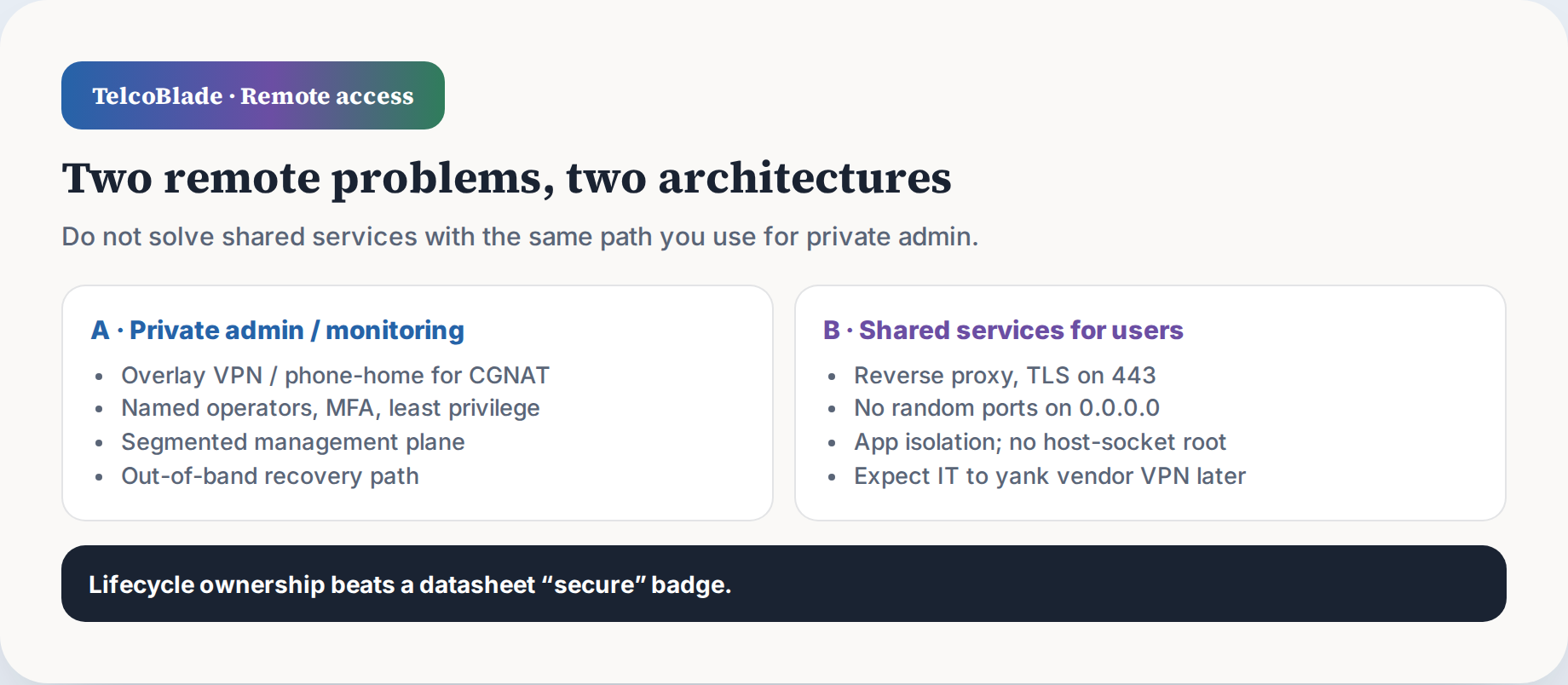
Split remote access into two problems. The first is private admin and monitoring access for your own team. The second is shared services access for vendors, integrators, or users who may need to view but not change. These require different controls.
For the private admin path, use a jump box. The gateway should not expose its management interface directly to the internet. Put an IoT VLAN between the gateway and the rest of the plant. Segment the management plane so a compromised gateway cannot reach PLC programming ports or SCADA servers.
For shared vendor access, keep it time-limited, read-only, and scoped to only the specific devices in scope. Do not hand a vendor a full site VPN and call it done. If the vendor needs to view a drive parameter, scope the path to that drive. Document every shared credential and revoke it after commissioning.
Edge app stacks are a common security failure. Some industrial gateways allow running Docker containers. If a container mounts the host Docker socket, that is essentially root on the edge box. Avoid docker.sock-class host socket mounts unless there is a very good reason. Treat any edge container runtime as a privilege boundary, not a convenient sandbox.
Patch ownership, secrets, privilege, and retirement are lifecycle questions. A “secure” badge means little if nobody updates firmware, default credentials stay in place, or the vendor leaves an access agent after commissioning. Plan for that: document access removal, revoke shared credentials, and provide a customer-controlled jump box if ongoing service is needed.
Checkpoint: You have a remote-access model and segmentation plan, with separate paths for private admin access and shared vendor access.
Step 7: Firmware Updates and Recovery
Auto-update is not the same as remote update, and neither is the same as “firmware support” on a datasheet. Auto-update means the gateway pulls and applies firmware without your approval. That is risky on an unattended remote device because an update can change a default route or reset a VPN config. Remote manual update lets you control timing, but it still depends on the in-band link. Datasheet firmware support may only mean files exist, not that rollback is available.
Require signed firmware images, a rollback partition, and staged or canary updates. Push to one low-risk site first, wait for a heartbeat, then roll to the rest. Never flash remotely without a tested rollback and out-of-band recovery. One failed update turns a five-minute job into a truck roll.
Remote firmware lockout without on-site eyes is the classic failure. If a bad image drops the cellular link or corrupts the network config, you are blind. Before any remote update, have an out-of-band path: a serial console, a secondary management network, local SD/USB media, or a reset image. Delayed-commit is useful: boot the new image, wait for a heartbeat, and only then mark it active. If the heartbeat fails, the device rolls back.
EMI and placement kill cellular gateways that worked on the bench. Inside a panel with VFDs, contactors, and unshielded wiring, the noise floor can swamp the receiver. Mount the gateway away from drives, use good grounding, and place the antenna where the site survey said it worked, not where the cable was short.
Checkpoint: You have an update/recovery path with out-of-band access, and the gateway placement matches the electromagnetic reality at the install point.
Step 8: Fit-Test Checklist
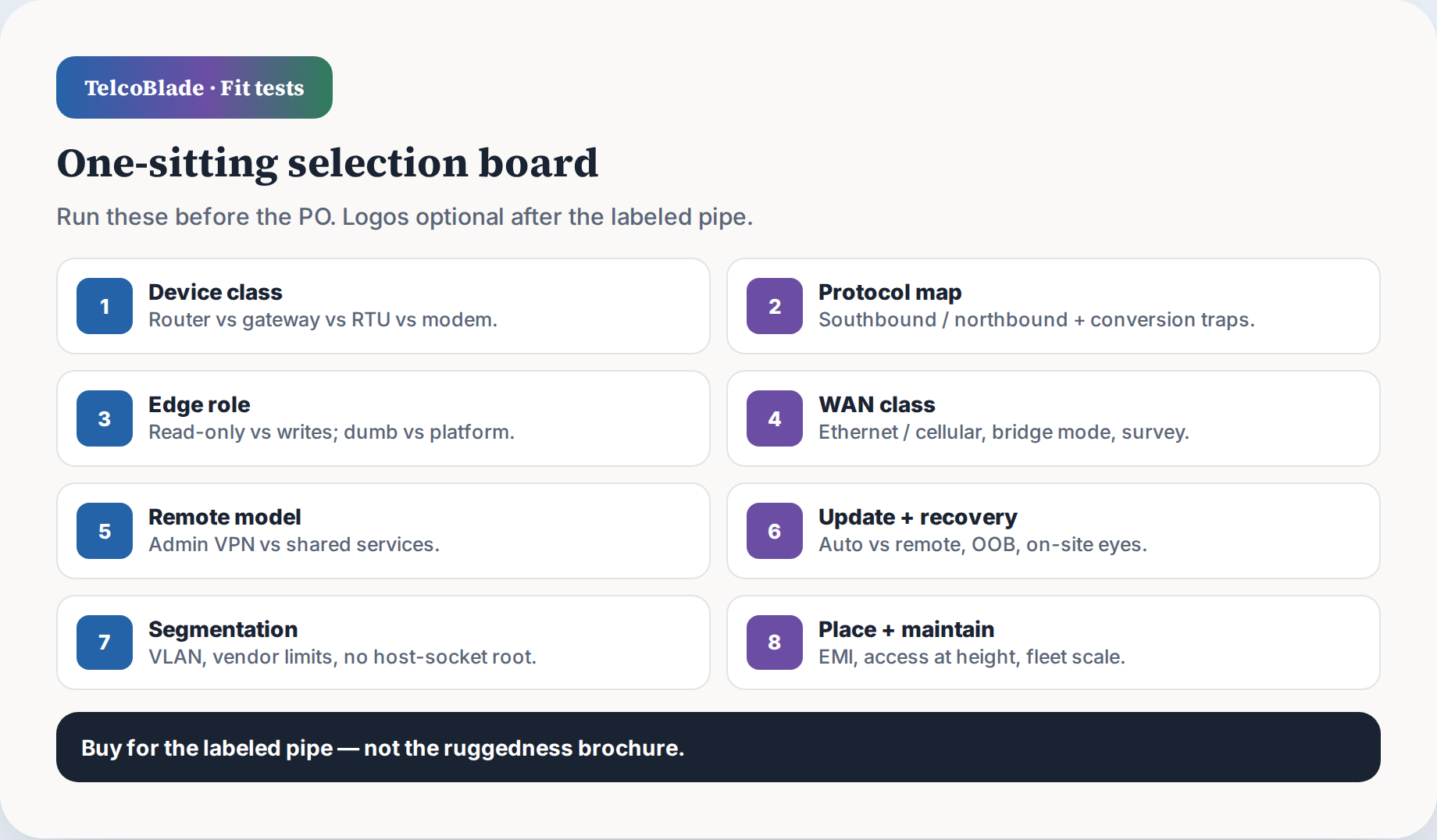
Run these before the PO, not after.
Pre-purchase fit test
- ☐ One-line job label written, with the exact southbound-to-northbound pipe.
- ☐ Device class selected: router, gateway, RTU, or modem.
- ☐ Southbound protocol list written, including serial connector and address count.
- ☐ Northbound target named: MQTT broker, OPC UA client, historian, REST, or cloud.
- ☐ Register poll verified against the actual field device.
- ☐ Read-only or write-capable decision signed off by the process owner.
- ☐ WAN class and cellular link mode selected, with no double NAT.
- ☐ Site RF survey completed at the actual panel or pad, with RSSI, RSRP, and SINR.
- ☐ Remote access split into private admin and vendor access paths.
- ☐ Vendor credential revoke plan documented before commissioning.
- ☐ Firmware recovery method tested: rollback, out-of-band path, delayed-commit if available.
- ☐ Panel placement confirmed away from VFDs and with antenna reach at the survey point.
Close with this: label the job, then buy for the labeled pipe. Logos are optional after the fit tests.
Checkpoint: You have checked every item in one sitting. Any blank means the class is wrong.
Troubleshooting
If the failure is plant Wi-Fi clients rather than gateway class or protocol conversion, use the smart-home Wi-Fi triage checklist instead of buying another industrial SKU.
Use this when a fit test fails in the field.
- Intermittent RS-485 faults after commissioning. Check the common/GND reference first. If the panel has VFDs, move the gateway and cable away from drives. Re-test with drives running and the enclosure closed.
- Gateway lockout after remote update. Connect to the out-of-band serial console or secondary management port. If none exists, send local hands to power-cycle and select the previous firmware image. Require delayed-commit from here on.
- No inbound access on CGNAT. Configure an outbound phone-home VPN initiated by the gateway to a fixed endpoint. Do not expect a public IPv4 address.
- Double NAT on cellular. Set the cellular modem to bridge mode, or configure the gateway as the single routed edge, not a second NAT layer.
- Modbus ID conflicts. Change slave IDs on the meters or use a gateway with multiple isolated RS-485 ports. Confirm the bus has a common/GND reference.
- Metallic panel kills cellular signal. Move the antenna outside the enclosure or away from the metal wall. Re-run the survey with the door closed and drives running.
- Vendor VPN removed after handoff. Plan the access removal in advance. Provide a customer-controlled jump box and document which services need the path. Do not leave vendor credentials in production.
- Fleet credentials after scaling. Use unique credentials per device, an enrollment process, rotation schedule, and deprovisioning step. A shared site password will spread failure across the whole fleet.
Checkpoint: You can map each failure to the original fit-test column that was skipped.